
Have you ever wondered how some desktop apps connect directly to powerful enterprise systems without using a browser? It may feel a bit surprising, especially in 2026, when most apps run on the web. But the truth is, many companies still use strong desktop apps that talk directly to servers. This is where the Application Client Container comes in.
The Application Client Container helps a simple Java app act like a smart client. It gives it tools like security, remote access, and easy connection to enterprise services. So instead of writing everything from scratch, developers can rely on this container to handle the hard parts.
In this article, we will explain everything in very easy words. You will learn what the Application Client Container is, how it works, why it still matters today, and how different parts come together. Don’t worry if you are new to this topic. We will go step by step, just like a simple story.
What Is Application Client Container?
The Application Client Container is a special runtime that runs Java apps on your computer. These apps are not simple programs. They are powerful apps that can talk directly to enterprise servers.
Think of it like this. Imagine you have a desktop app for your office. This app needs to get data from a company server. Instead of building everything yourself, the Application Client Container gives your app ready-made tools to connect, send requests, and get results safely.
Another simple way to understand this is to compare it with a normal Java app. A normal app runs alone. But an app inside the Application Client Container is “managed.” This means it gets extra help like security, auto setup, and easy communication with servers. This makes it much stronger and more useful in big systems.
Why Application Client Container Is Still Important
You might think this is an old idea. But the Application Client Container is still used in 2026, especially in large companies. Many systems in banks, hospitals, and government offices still rely on it.
Why? Because these systems need strong security and stable connections. The Application Client Container provides both. It allows apps to connect directly to backend systems without using a web browser. This is very useful for internal tools that only employees use.
Also, many companies still use older enterprise systems. These systems were built using technologies like EJB and RMI. The Application Client Container works perfectly with them. Instead of replacing everything, companies keep using this setup because it is safe, tested, and reliable.
How Application Client Container Works (Step by Step)
Let’s break it down in a very simple way. The Application Client Container follows a clear process. Once you understand it, everything becomes easy.
First, the developer creates a Java app. This app is then packed into a file called a JAR file. Inside this file, there is also a small config file that tells the system how the app should run.
Next, this app is deployed to a server. The server prepares everything the app needs. After that, the user runs the app using a tool like appclient. At this point, the Application Client Container starts working. It sets up the environment, connects to the server, and prepares the app.
Then comes the login step. If security is enabled, the user enters their details. Once verified, the app connects to the server and sends requests. The server processes the request and sends back the result. The Application Client Container receives it and shows it to the user. Simple and smooth.
Application Client Container Architecture Made Simple
To understand the Application Client Container better, we need to look at how the system is designed. Don’t worry, we will keep it very simple.
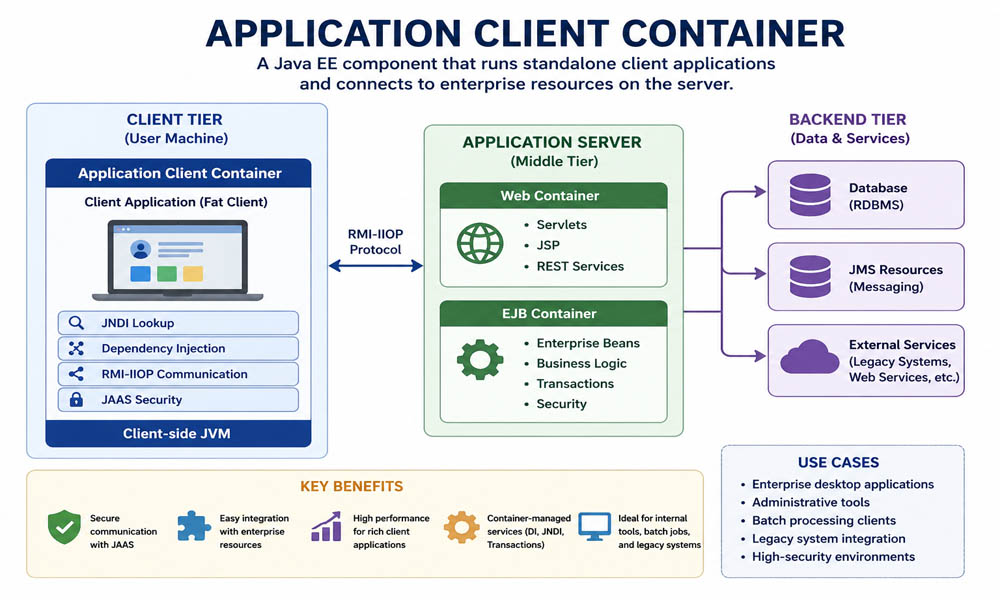
There are three main layers in this setup. The first is the client layer. This is where the Application Client Container runs. It is on the user’s machine. This is where the app lives and starts.
The second layer is the middle layer. This is where the main business logic runs. It includes things like web services and enterprise beans. This layer handles the real work, like processing data and making decisions.
The third layer is the backend. This is where the data is stored. It includes databases and other systems. The Application Client Container helps the client app talk to these layers in a clean and organized way. Each layer has its own role, which keeps everything simple and easy to manage.
Application Client Container and Client Types (Thin vs Fat)
Now let’s talk about two common types of clients. This will help you understand where the Application Client Container fits.
The first type is a thin client. This is what you use every day in your browser. Think of websites and web apps. In this case, most of the work is done on the server. Your browser just shows the result.
The second type is a fat client. This is where the Application Client Container comes in. A fat client is a full app that runs on your computer. It does more work on its own and connects directly to the server. It does not depend on a browser.
For example, imagine a company tool used by employees. It may have a full desktop interface and strong security. This is a perfect case for a fat client using the Application Client Container. It gives more control and better performance for such tasks.
Key Parts of Application Client Container
The Application Client Container may sound complex, but it is built from simple parts. Let’s understand them in an easy way.
First, there is the JVM. This is the engine that runs the Java app. Without it, nothing works. It handles memory, runs the code, and connects with the system.
Next, there is the XML file called application-client.xml. This file tells the app how to behave. It includes details like where to connect and what resources to use. It is like a small guide for the app.
Then comes JNDI. This helps the app find services on the server. Instead of hardcoding everything, the app can just ask, “Where is this service?” and JNDI gives the answer. Along with this, we have Dependency Injection. This makes things even easier by automatically connecting needed resources.
Finally, there is RMI for communication and JAAS for security. RMI helps the app talk to the server, while JAAS makes sure only the right users can access the system. Together, these parts make the Application Client Container powerful and easy to use.
Application Client Container Security Features
Now let’s talk about something very important — security. When apps connect directly to servers, safety matters a lot. The Application Client Container is built to handle this in a strong and simple way.
First, it uses a login system called JAAS. When you open the app, it may ask for your username and password. This step makes sure only the right people can use the system. Think of it like unlocking a secure door before entering an office.
Next, the data sent between the app and the server is protected. The Application Client Container supports secure connections, like SSL. This means your data is safe while it travels. It also supports role-based access. For example, a manager may see more data than a normal employee. This keeps everything controlled and safe.
Application Client Container vs Web and EJB Containers
You may now wonder how the Application Client Container is different from other containers. Let’s make it very simple.
A web container runs web apps. These are apps you open in a browser. It handles pages, forms, and user requests over the internet. Everything happens on the server side, and you just see the result in your browser.
An EJB container is also on the server. It handles business logic. This means it runs the main logic of the system, like processing orders or managing data. Now, the Application Client Container is different. It runs on your own machine. It helps your desktop app connect to the server and use those services directly.
Real Example of Application Client Container (GlassFish)
Let’s make this even more real with a simple example. One popular tool is the GlassFish appclient tool. It helps run apps using the Application Client Container.
Imagine you have a client app saved as a JAR file. You can run it with a simple command. The tool sets up everything for you. It prepares the environment, reads the config file, and starts the app.
Once the app starts, the Application Client Container takes control. It connects to the server, handles login, and allows the app to send requests. This makes life easy for developers because they don’t need to build all these steps manually.
Application Client Container in Modern World (2026)
Now let’s look at today’s world. In 2026, many apps use web APIs and cloud systems. So where does the Application Client Container fit?
It still plays a role in special cases. Some companies need strong desktop apps with direct server access. For example, banks and hospitals often use systems where security and speed are very important. In these cases, the Application Client Container is still a great choice.
Also, modern tools like Docker are now used with it. Developers can pack the app and its environment into a container. This makes it easy to run the app anywhere. So even though it is an older idea, the Application Client Container is still growing with new tools.
When Should You Use Application Client Container?
You should use the Application Client Container when you need a strong desktop app. For example, if your app needs direct access to server services, this is a good choice.
It is also useful for internal tools. Think of apps used by employees inside a company. These apps often need high security and fast access to data. The Application Client Container handles both very well.
But it is not always the best option. If you are building a simple public website or mobile app, a web-based solution is easier. So it is important to choose the right tool based on your needs.
Best Practices for Application Client Container
If you plan to use the Application Client Container, there are some simple tips that can help you.
First, keep your setup clean. Use configuration files instead of hardcoding values. This makes your app easy to update later. Also, try to use dependency injection. It saves time and keeps your code simple.
Second, always focus on security. Make sure login and access rules are set properly. Test your app before using it in real work. A small test can help you avoid big problems later. These small steps can make your Application Client Container app strong and reliable.
Conclusion
So, what have we learned? The Application Client Container is a powerful tool that helps Java apps connect directly to enterprise systems. It gives support for security, communication, and easy setup.
Even in 2026, it still has value. While many apps now use web services, some systems still need strong desktop apps. In those cases, the Application Client Container is a smart and trusted choice.
If you are working with enterprise Java or learning about it, understanding the Application Client Container can really help. It may not be used everywhere, but where it is used, it plays a very important role.
(FAQs)
What is an Application Client Container in simple words?
The Application Client Container is a tool that helps a Java desktop app connect directly to a server. It gives the app built-in features like security, easy connection, and remote access, so developers don’t have to build everything from scratch.
Is the Application Client Container still used in 2026?
Yes, it is still used in 2026, especially in banks, hospitals, and government systems. These industries need strong security and stable systems, and the Application Client Container provides both.
How is Application Client Container different from a normal Java app?
A normal Java app runs on its own and handles everything manually. But an app inside the Application Client Container gets extra support like security, dependency injection, and easy server connection, which makes it more powerful.
What type of apps use the Application Client Container?
It is mainly used for desktop apps (fat clients) that need direct access to enterprise servers. These apps are often internal tools used by employees in large companies.
How does an Application Client Container connect to a server?
It connects using tools like JNDI and RMI. First, it finds the service using JNDI, then communicates with the server using remote calls. This process is handled automatically by the container.
Is the Application Client Container secure?
Yes, it is very secure. It uses JAAS for login, supports encrypted connections, and allows role-based access. This means only the right users can access specific parts of the system.
What is the role of application-client.xml in the Application Client Container?
This file is like a guide for the app. It tells the Application Client Container how the app should run, what resources to use, and how to connect to the server.
Can the Application Client Container work without XML configuration?
Yes, in many cases it can work without XML by using annotations like @EJB and @Resource. However, the XML file is still helpful for complex setups and better control.
When should you avoid using the Application Client Container?
You should avoid it for simple apps like websites or mobile apps. In those cases, using REST APIs or web apps is easier and more modern.
Can Application Client Container apps be used with modern tools like Docker?
Yes, they can. Developers can package the app with its environment into a Docker container. This makes it easy to run the app on different systems without setup issues.
You may also read: Norfolk Southern Mainframe: The Hidden System Running Every Train