
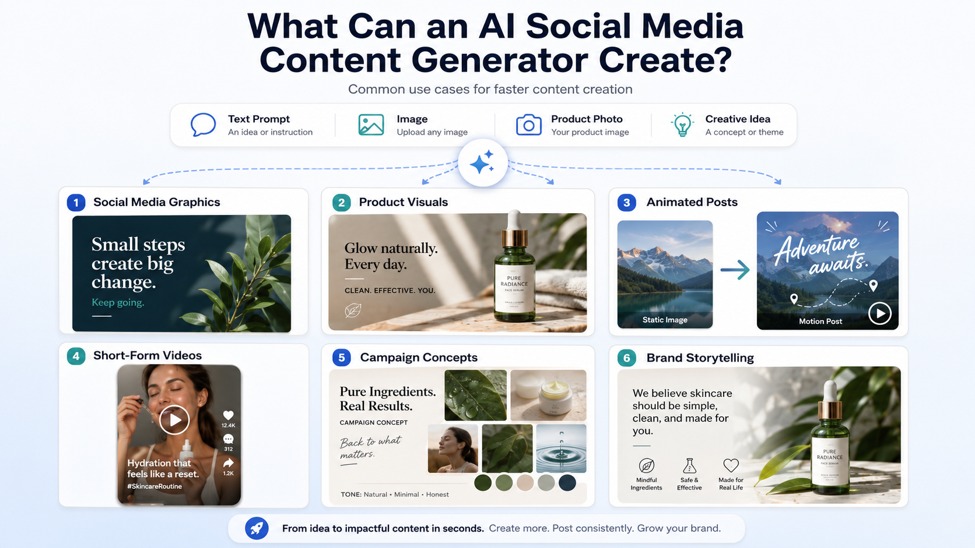
Social media content now moves faster than ever. Brands, small businesses, influencers, and independent creators are expected to publish regularly across platforms like Instagram, TikTok, Facebook, YouTube Shorts, LinkedIn, and X. A single post may need a strong image, a short video, a caption, a hook, a product visual, or a version made for a different platform.
For many users, the hardest part is not having ideas. It is turning those ideas into content quickly enough. Designing graphics, editing short clips, adding effects, and repurposing existing images can take hours, especially for creators who do not have a full design or video team.
This is where an AI social media content generator can help. Instead of starting every image or video from scratch, users can create visuals, animate photos, generate short clips, and test different content styles with AI. Tools like AIReel make this process even easier by combining AI image generation, image-to-video, text-to-video, AI effects, multiple AI models, and smart routing in one workflow.
Why Social Media Content Takes So Much Time
Creating social media content is rarely just one task. A creator may need a post image for Instagram, a short video for TikTok, a thumbnail for YouTube Shorts, and a promotional visual for Facebook or LinkedIn. Even when the message is the same, each platform often needs a different format, length, style, or visual hook.
Small businesses and creators usually face several common problems:
- They need fresh visuals but do not always have new photos.
- They want to post short videos but may not have editing skills.
- They have product images but need to make them more engaging.
- They want to test different styles but do not have time to redesign everything.
- They need to keep posting consistently without lowering content quality.
Traditional editing tools can still be useful, but they often require more time, more manual work, and more creative resources. An AI social media content generator helps reduce this pressure by giving users faster ways to create images, animated posts, and short videos from simple prompts or existing visuals.
What Can an AI Social Media Content Generator Create?
An AI social media generator can help users create different types of content for online platforms. Depending on the tool, users can start from a text prompt, an image, a product photo, or a creative idea.
Common use cases include:
- Social media graphics
Users can create post images, promotional visuals, quote graphics, campaign images, and branded backgrounds. - Product visuals
Small businesses can turn simple product photos into more polished lifestyle images, promotional graphics, or short product clips. - Animated posts
Static images can be turned into moving visuals that feel more engaging in a fast-scrolling feed. - Short-form videos
AI can help generate short clips for TikTok, Instagram Reels, YouTube Shorts, and other video-first platforms. - Campaign concepts
Marketers can quickly test different visual directions before committing to a final campaign style. - Brand storytelling content
Creators can use AI-generated images and videos to explain ideas, show product benefits, or build a stronger visual identity.
The main value is speed. Instead of spending hours producing every asset manually, users can generate first drafts, test variations, and improve content faster.
Turning One Image into Multiple Short Videos
One of the most useful AI content creation workflows is turning an existing image into a short video. Many creators already have useful visual assets, such as product photos, travel pictures, portraits, event posters, brand graphics, or AI-generated images. The challenge is that static images may not always stand out in a crowded feed.
Image-to-video AI helps solve this problem. It can add motion, camera movement, atmosphere, transitions, or visual effects to a still image, making it more suitable for social media video formats.
For example:
- A product photo can become a short promotional teaser.
- A travel image can become a moving scenic clip.
- A fashion photo can become a dynamic showcase.
- A real estate image can become a short property preview.
- A campaign poster can become an animated announcement.
- A portfolio image can become a social media intro.
This allows users to get more value from the visuals they already have. Instead of creating new content from zero, they can repurpose existing images into short videos for different platforms.
How AIReel Helps Creators Make Social Media Content Faster
AIReel is useful for social media creators because it brings several visual creation tools into one workflow. Instead of using one platform for images, another for video, and another for effects, users can create different types of social content in the same place.
- AI image generation for social visuals
Users can create post images, product-style graphics, thumbnails, campaign visuals, and creative backgrounds from text prompts. This is helpful when they need fresh visuals but do not have new photos or design resources. - Image-to-video for turning photos into clips
Existing photos, product images, posters, travel shots, or AI-generated visuals can be turned into short animated videos. This is especially useful for Reels, Shorts, TikTok videos, product teasers, and promotional posts. - Text-to-video for quick content ideas
Users can describe a short scene, product idea, social media concept, or promotional message and generate a video from a written prompt. This gives creators another way to start when they do not already have an image. - 1000+ AI effects for faster style testing
AIReel offers 1000+ AI effects, which can help users quickly test different looks, moods, and creative formats. This is useful for creators who want to try seasonal visuals, character effects, cinematic styles, product-focused looks, or social-media-friendly designs without building every effect manually. - Multiple AI models for different content needs
A product teaser, animated post, lifestyle clip, and cinematic short video may not need the same type of AI model. AIReel brings together multiple AI models, giving users more flexibility for different visual goals. - Smart routing to reduce guesswork
One challenge with multi-model AI tools is knowing which model to choose. AIReel’s smart routing feature can analyze the user’s prompt and recommend or automatically select a suitable model. This helps users spend less time comparing models and more time creating content.
For social media creators, this kind of workflow is practical because it supports different starting points. A user can begin with a prompt, an image, a product photo, or an AI-generated visual, then turn it into content that fits a specific platform or campaign.
Tips for Better AI-Generated Social Media Videos
AI can make video creation faster, but better results still depend on how users choose the source image, describe the motion, and prepare the final clip for each platform. A good AI-generated social media video should be simple, clear, and easy to understand within the first few seconds.
Start with a Strong Image
The source image matters. A clear product photo, portrait, travel shot, poster, or brand visual will usually work better than a crowded image with too many competing details. When the main subject is easy to recognize, the AI has a clearer starting point for creating motion.
Keep the Movement Natural
Short social videos do not always need dramatic effects. A slow camera push-in, gentle background movement, soft lighting change, or subtle product motion can often look more polished than heavy animation. The goal is to make the image feel alive without distracting from the message.
Write a Clear Motion Prompt
A vague prompt like “make this move” may lead to unpredictable results. It is better to describe the exact type of motion, such as “slow zoom toward the product,” “soft wind moving in the background,” or “cinematic light passing across the scene.” Clear prompts help the AI understand what kind of video the user wants.
Match the Video Style to the Platform
Different platforms need different styles. TikTok and Instagram Reels often work better with quick, eye-catching visuals, while LinkedIn may need a cleaner and more professional look. Before generating the video, users should think about where it will be posted and what kind of audience will see it.
Test More Than One Version
One image can often become several different videos. A product photo might work as a clean product teaser, a lifestyle-style clip, or a more cinematic promotional video. Testing a few versions helps users find the style that feels most suitable before posting.
Review the Video Before Publishing
AI-generated videos should still be checked by a person before they go live. Users should look for strange motion, distorted details, awkward transitions, or visuals that do not match the brand. Captions, text overlays, product names, and calls to action can also be added after generation to make the video clearer for social media.
Conclusion
An AI social media content generator can help creators reduce the time spent on repetitive visual production. Instead of designing every image, editing every clip, or starting each post from scratch, users can create graphics, animate photos, and generate short videos more quickly.
For creators, small businesses, and marketing teams, the real value is not replacing strategy or creativity. It is making the production process easier. AI tools can help users turn ideas into visuals, turn images into videos, and create more content without needing a full design or editing team.
AIReel fits naturally into this shift by combining AI image generation, image-to-video, text-to-video, 1000+ AI effects, multiple AI models, and smart routing in one platform. For users who want to create images, posts, and short videos faster, it offers a more connected way to move from idea to social media-ready content.