
Today, almost every business depends on digital systems. Apps run on cloud platforms. Data moves between servers. And many systems work together at the same time. But here is the problem—most companies cannot clearly see how everything is connected.
Think about this. What if one small app stops working, and suddenly your whole system slows down? You might not even know why. This happens because modern IT systems are like a web. Everything is connected, but the connections are often hidden.
This is where vRealize Infrastructure Navigator becomes very helpful. It acts like a smart map that shows how your systems, apps, and servers are linked. In this article, we will explain everything in a simple way. You will learn what it is, how it works, and why it is so useful in today’s IT world.
What Is vRealize Infrastructure Navigator?
vRealize Infrastructure Navigator is a tool made by VMware. It helps IT teams understand how their applications and systems are connected. It works inside VMware’s environment, like vSphere and the vRealize Suite.
In very simple words, it shows you a clear picture of your IT setup. It tells you which app is connected to which server. It also shows how different systems depend on each other. This makes it easier to manage everything without confusion.
Imagine trying to fix a problem without knowing where it started. That would be hard, right? With vRealize Infrastructure Navigator, you can see the full picture. This helps you find problems faster and fix them without guessing.
Why vRealize Infrastructure Navigator Is Important Today
In the past, IT systems were simple. One server ran one app. Everything was easy to understand. But today, things are very different. One app may depend on many services. These services may be in different places, like cloud platforms or data centers.
Because of this, IT teams often face problems. They may not know how apps are connected. They may miss important details during updates. This can lead to system crashes or downtime.
vRealize Infrastructure Navigator solves this problem by showing all connections clearly. It helps teams understand what depends on what. This is very important when moving apps, fixing issues, or planning upgrades.
How vRealize Infrastructure Navigator Works (Simple Guide)
Let’s break it down in a simple way. vRealize Infrastructure Navigator works by adding a small virtual tool inside your system. This tool starts scanning your environment.
It looks at your virtual machines, applications, and network activity. It uses VMware Tools and built-in monitoring to collect data. The best part is that it does this automatically. You don’t have to enter everything by hand.
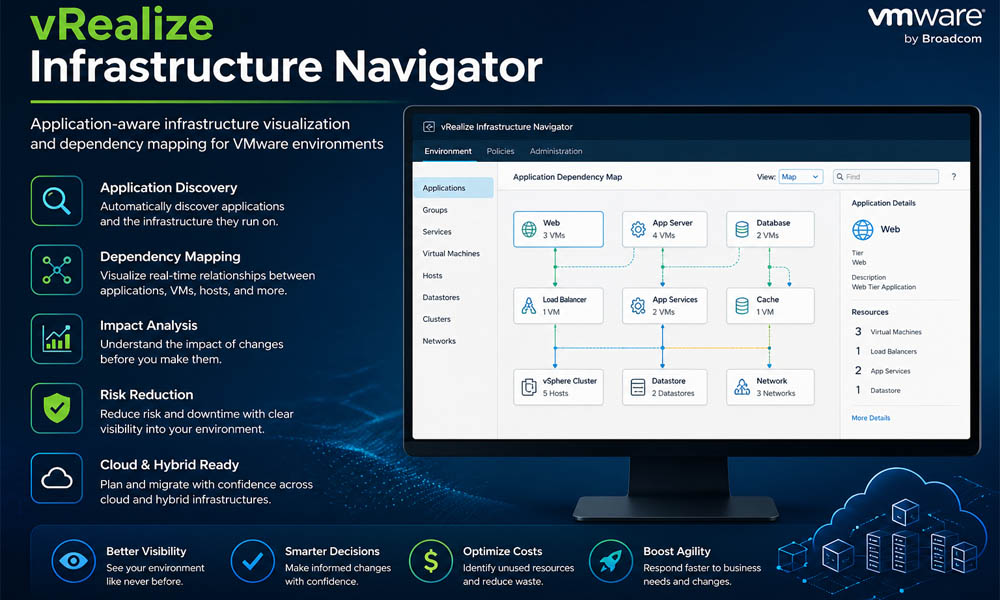
After collecting the data, it creates a visual map. This map shows how everything is connected. You can see which app talks to which server. You can also see how one change may affect other systems.
Key Features of vRealize Infrastructure Navigator
One of the best things about vRealize Infrastructure Navigator is its features. These features make IT management much easier and safer.
First, it offers automatic application discovery. This means it finds applications on its own. You don’t need to track them manually. This saves time and avoids mistakes.
Second, it provides real-time dependency mapping. This shows how systems are connected right now. If something changes, the map updates instantly. This helps you make better decisions.
Another great feature is its smooth integration with VMware tools. If you already use VMware, this tool fits in perfectly. It also supports workload management and helps with security and compliance checks.
vRealize Infrastructure Navigator and Application Discovery
Let’s talk more about application discovery. This is one of the most helpful parts of vRealize Infrastructure Navigator.
In many companies, IT teams don’t always know every app running in their system. Some apps may be old. Some may not be documented. This can cause problems during updates or audits.
With vRealize Infrastructure Navigator, the tool finds these apps automatically. It scans your system and lists everything clearly. This helps teams stay organized and avoid surprises.
vRealize Infrastructure Navigator Dependency Mapping Made Easy
Now, let’s understand dependency mapping in a simple way. It means showing how different parts of your system depend on each other.
For example, one app may need a database to work. That database may need a server. If one part fails, the whole system can be affected. Without a clear map, this is hard to track.
vRealize Infrastructure Navigator solves this by showing a visual map. You can see all connections in one place. This makes it easier to plan changes and avoid breaking important systems.
Top Benefits of vRealize Infrastructure Navigator
Using vRealize Infrastructure Navigator brings many benefits. One of the biggest is better visibility. You can see your entire system clearly, without guessing.
Another benefit is lower risk. When you understand dependencies, you avoid mistakes during updates or migrations. This means less downtime and fewer problems.
It also helps save money. By finding unused apps or resources, companies can reduce waste. Plus, it improves speed. IT teams can make faster and smarter decisions.
vRealize Infrastructure Navigator in Cloud and Hybrid Systems
Today, many businesses use cloud platforms like AWS or Azure. Some use a mix of cloud and on-site systems. This is called a hybrid environment.
Managing these systems can be tricky. Apps may be spread across different platforms. Without clear visibility, moving them can be risky.
vRealize Infrastructure Navigator helps by showing how apps are connected, even across cloud and hybrid systems. It helps teams move apps safely and keep everything running smoothly.
Real-Life Use Cases of vRealize Infrastructure Navigator
Let’s look at how companies actually use vRealize Infrastructure Navigator in real life.
Many businesses use it during data center changes. When they move or combine systems, they need to know what depends on what. This tool helps them do that safely.
It is also useful for disaster recovery planning. Companies can see which systems are most important. This helps them prepare better plans to avoid major problems.
Another common use is cloud migration. Before moving apps to the cloud, teams use vRealize Infrastructure Navigator to understand dependencies. This reduces the risk of failure.
Problems Without vRealize Infrastructure Navigator
Now let’s imagine a system without vRealize Infrastructure Navigator. At first, everything may seem fine. But when something goes wrong, things quickly become confusing.
For example, an IT team may try to update a server. But they don’t know that this server is connected to many apps. After the update, some apps stop working. The team now has to spend hours trying to find the issue. This wastes time and can affect business work.
Another big problem is hidden dependencies. Without a clear view, teams miss important connections. This increases the risk of downtime, failed migrations, and even security issues. That’s why tools like vRealize Infrastructure Navigator are so important today.
vRealize Infrastructure Navigator vs Other Tools
You may wonder, are there other tools like this? Yes, there are tools such as SolarWinds, Dynatrace, and AppDynamics. They also help with monitoring and performance.
But here is the key difference. vRealize Infrastructure Navigator works deeply with VMware systems. If your company already uses VMware, this tool fits in perfectly. It feels natural and easy to use.
Other tools may need extra setup or may not show the same level of detail in VMware environments. So, if you are already using VMware, vRealize Infrastructure Navigator is often the smarter and simpler choice.
Future of IT with vRealize Infrastructure Navigator
Let’s look ahead to the future. IT systems are becoming even more complex in 2026. More apps are moving to the cloud. More data is being used every second.
In the future, tools like vRealize Infrastructure Navigator will become even smarter. They will use AI to predict problems before they happen. Imagine getting a warning before a system fails. That would save a lot of time and stress.
We may also see self-healing systems. This means the system can fix small problems on its own. vRealize Infrastructure Navigator is a strong step toward that future by giving clear and useful insights today.
Best Practices for Using vRealize Infrastructure Navigator
To get the best results, it is important to use vRealize Infrastructure Navigator the right way. A good start is to begin with a small setup. Test it in one part of your system before using it everywhere.
Another tip is to keep your VMware Tools updated. This helps the tool find apps correctly. If your tools are outdated, the data may not be accurate.
Also, train your IT team properly. Make sure they understand how to read the maps and use the data. When used correctly, vRealize Infrastructure Navigator becomes a powerful tool for planning and decision-making.
Step-by-Step Guide to Get Started with vRealize Infrastructure Navigator
Getting started with vRealize Infrastructure Navigator is easier than you may think. First, you need to deploy the virtual appliance in your VMware environment.
Next, connect it to your vSphere system. Once connected, turn on automatic application discovery. The tool will begin scanning your environment.
After that, you can open the dashboard and view the maps. These maps will show all connections clearly. From here, you can use the insights to plan updates, fix issues, or move apps safely.
Common Mistakes to Avoid with vRealize Infrastructure Navigator
Even though vRealize Infrastructure Navigator is easy to use, some mistakes can reduce its value. One common mistake is ignoring the dependency data. The maps are there to guide you, so always use them when making changes.
Another mistake is not updating VMware Tools. This can lead to missing or wrong information. Always keep your system updated for the best results.
Some teams also forget to train their staff. If people don’t understand the tool, they may not use it properly. Avoid this by giving simple training and regular practice.
Conclusion
So, is vRealize Infrastructure Navigator worth using? For most businesses, the answer is yes. It makes complex systems easy to understand. It reduces risk and saves time.
Think about how much trouble you can avoid by knowing how everything is connected. No more guessing. No more hidden problems. Just clear and simple visibility.
In today’s fast-moving digital world, having control over your systems is very important. vRealize Infrastructure Navigator gives you that control. It helps you work smarter, faster, and with more confidence.
(FAQs)
What is vRealize Infrastructure Navigator in simple words?
vRealize Infrastructure Navigator is a VMware tool that helps you see how your apps and systems are connected. It shows a clear map of your IT environment so you can understand everything easily.
How does vRealize Infrastructure Navigator work?
It works by scanning your virtual systems using VMware Tools and network data. Then it creates a visual map that shows how apps, servers, and services are linked in real time.
Why is vRealize Infrastructure Navigator important in 2026?
In 2026, IT systems are more complex than ever. Apps run across cloud and hybrid systems. This tool helps teams understand connections and avoid costly mistakes like downtime or failed updates.
What are the main features of vRealize Infrastructure Navigator?
Some key features include automatic app discovery, real-time dependency mapping, VMware integration, workload tracking, and support for security and compliance.
Can vRealize Infrastructure Navigator help with cloud migration?
Yes, it is very helpful for cloud migration. It shows which apps depend on each other, so you can move them together safely without breaking anything.
Is vRealize Infrastructure Navigator only for VMware users?
It works best in VMware environments like vSphere. If your company already uses VMware, this tool fits perfectly and gives deeper insights than many other tools.
What problems does vRealize Infrastructure Navigator solve?
It solves problems like hidden system connections, unexpected downtime, failed migrations, and poor visibility in complex IT environments.
How does vRealize Infrastructure Navigator improve security?
It helps find unknown apps and connections in your system. This makes it easier to spot risks and keep your system safe and compliant.
Is vRealize Infrastructure Navigator hard to set up?
No, it is quite simple. You just deploy a virtual appliance, connect it to vSphere, and turn on discovery. After that, it starts working automatically.
Who should use vRealize Infrastructure Navigator?
It is best for IT teams, system admins, and businesses that use virtual or cloud systems. If you want better control and visibility, this tool is a great choice.
You may also read: Chief Technical Examiner: What They Do and Why They Matter So Much