
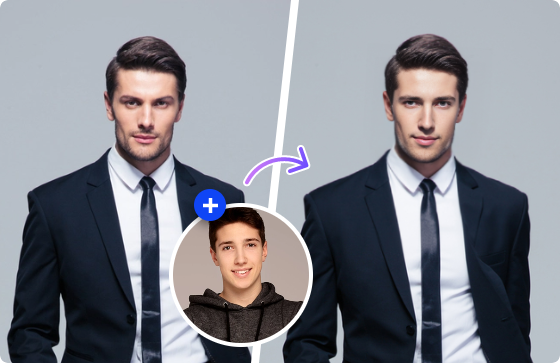
The way we edit and interact with photos and videos has been completely transformed by artificial intelligence. What once required expensive software and hours of manual editing can now be done in seconds for free, directly in your browser. Two tools making waves in this space are the face swap tool and the multiple face swap tool both offering remarkable results with zero technical expertise required.
Whether you’re a content creator, social media enthusiast, or just someone who loves experimenting with creative visuals, this review breaks down everything you need to know.
What Is the Face Swap Tool?
The face swap tool is a free, AI-powered solution that lets you replace any face in a photo, video, or GIF with another face of your choice. The process is straightforward: upload your source image or video, upload the target face photo, and hit swap. The AI handles all the complex processing matching skin tone, lighting, and facial geometry to produce a seamless, realistic result.
What truly sets this tool apart from competitors is its support for multiple media formats. You’re not limited to still images; it handles GIFs and videos too, including MP4, MOV, M4V, and WEBM formats.
Key Features of the Face Swap Tool
- Photo Face Swap: Replace faces in still images with sharp, natural-looking results.
- Video Face Swap: Swap faces in video clips across a wide range of formats, up to 200MB in size.
- GIF Support: Bring face swaps to life in animated GIFs.
- Cross-Gender & Cross-Age Swapping: The AI handles swaps across different genders, skin tones, and age groups with impressive accuracy.
- 100% Free: Core features are fully accessible at no cost.
- No Watermarks on Download: Get clean, publishable results straight away.
- Fast Processing: Results are generated quickly, even for video content.
What Is the Multiple Face Swap Tool?
While the standard face swap tool excels at single-face replacements, the multiple face swap tool takes things further by letting you swap every face in a group photo or video simultaneously. It’s the perfect solution for team photos, family portraits, group videos, and any scene featuring more than one person.
The AI automatically detects all visible faces in the uploaded image or video and allows you to assign a different replacement face to each one. The result is a fully transformed group image or video, all processed in one go.
Key Features of the Multiple Face Swap Tool
- Photo Multi-Face Swap: Upload a group photo and swap every face at once with ease.
- Video Multi-Face Swap: Replace multiple faces in video footage simultaneously for dynamic results.
- Automatic Face Detection: The AI identifies all faces in the frame without any manual selection required.
- Individual Face Assignment: Assign a unique replacement face to each detected person in the image or video.
- High-Quality Output: Results maintain sharpness and realism even when multiple faces are processed together.
- Completely Free: No subscription or payment needed to access core features.
How to Use the Face Swap Video Tool
One of the most exciting features across both tools is multiple face swap video online free capability. Here’s how simple the process is:
- Upload your source video: Drag and drop or browse to select your clip (supports MP4, MOV, M4V, WEBM, and GIF).
- Upload the target face photo: Choose a clear, front-facing photo of the face you want to use.
- Click “Swap Face Now”: The AI processes your video and delivers a ready-to-download result.
That’s it. No timeline editing, no masking, no frame-by-frame adjustments. The AI handles everything automatically.
Who Are These Tools For?
These tools serve an impressively broad range of users:
- Social Media Creators who need fresh, engaging visual content regularly.
- Video Producers looking for quick, convincing face replacement without expensive editing suites.
- Entertainers & Meme Creators who want to place faces onto famous scenes or characters.
- Businesses & Marketers who need unique visuals for campaigns without costly productions.
- Casual Users who simply want to have fun with photos of friends and family.
Final Verdict
Both the face swap and multiple face swap tools deliver on their promises fast, realistic, and free. The single face swap tool is ideal for individual photo and video edits, while the multiple face swap tool is a standout feature for group content that most competing platforms charge a premium for. Together, they form a complete AI face-editing solution that’s accessible to absolutely everyone.
Try them today, you’ll be amazed at what a few seconds and a single upload can produce.